
Stock Availability
What is Stock Availability?
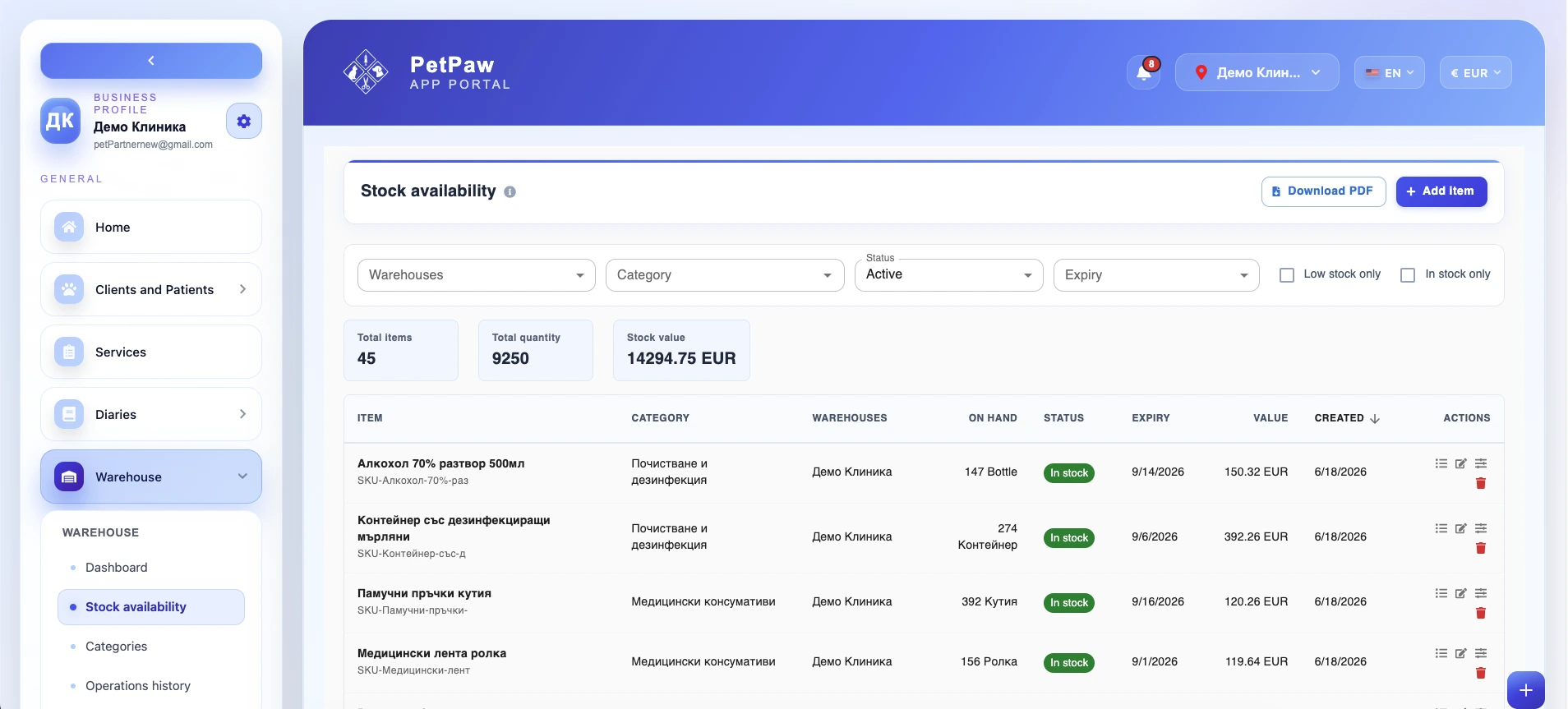
The Stock Availability page gives you a detailed view of the products currently stored in your clinic's warehouse. It is designed to help you monitor what is in stock, where it is located, how much is available, and whether any items need attention because of low quantity, expiry, or stock inconsistencies.
Unlike the Warehouse Dashboard, which gives you a high-level summary, the Stock Availability page focuses on the actual stock records and allows you to review them in detail.
How to open Stock Availability
- Log in to the app portal.
- From the left navigation menu, open Warehouse.
- Select Stock Availability.
The page opens as a table view where each row represents a stock item or stock record.
What information is shown
The Stock Availability page provides a detailed stock list with important inventory information for each item. Depending on your setup, the list may include the following fields:
Item name
The name of the product, supply, medication, or equipment item stored in the warehouse.
Category
The category assigned to the item, such as medical consumables, cleaning products, surgical equipment, diagnostic equipment, and others.
Warehouse
Shows the warehouse or storage location where the item is currently stored.
Quantity on hand
Displays the currently available quantity for the item.
Stock status
Shows the stock condition of the item:
- in stock
- low stock
- out of stock
- negative stock
- archived
This helps staff quickly identify items that need action.
Expiry date
Shows the expiry date for items that are tracked by expiration. This is especially important for medications, consumables, and other time-sensitive supplies.
Batch number
Displays the batch or lot number associated with the item, if available. This is useful for traceability and internal stock control.
SKU
Shows the internal stock keeping unit used to identify the product in the system.
Barcode
Displays the barcode linked to the item, if one has been added.
Stock value
Shows the total value of the currently available quantity for that item, based on the pricing or valuation data stored in the system.
Filtering stock availability
To help you find the exact stock records you need, the page allows you to filter the stock list using different criteria:
Warehouse — show only items from a selected warehouse or storage location.
Category — narrow the list to a specific product category.
Low-stock items — display only items that have reached or fallen below their low-stock threshold.
In-stock items — show only products that currently have available quantity.
Expired items — display products whose expiry date has already passed.
Expiring items — show products that will expire soon, depending on the configured time range or available filter options.
Negative stock — display items whose quantity is below zero and may require investigation or correction.
Archived products — show products that have been archived but are still retained in the system for historical or reporting purposes.
These filters make it easier to review stock health, prepare restocking actions, and identify issues before they affect daily work.
Search and review stock records
The Stock Availability page is useful when you need to quickly locate a specific item or review the current state of your inventory. You can use it to:
- check whether a product is available
- confirm how much quantity is left
- see which warehouse holds the stock
- review expiring or expired items
- verify batch, barcode, or SKU information
- identify products with negative or low stock
- review the value of available stock
This makes the page useful both for daily operational checks and for internal stock reviews.
Download a Stock Availability PDF
You can generate and download a Stock Availability PDF for internal review. This can be useful when you need to:
- review stock outside the system
- share stock information internally
- prepare an inventory review meeting
- keep a static snapshot of stock at a given moment
- print stock information for internal use
The exact content of the PDF may depend on the filters currently applied and the data available in the system.
Why Stock Availability is useful
The Stock Availability page helps your clinic:
- keep a detailed view of all current stock records
- quickly identify low, expired, or problematic stock
- check stock quantities by warehouse and category
- review item-level details such as batch, barcode, and SKU
- monitor expiry-sensitive products more closely
- export stock information for internal review or documentation
It is one of the main operational pages for day-to-day warehouse management.
Best practices
To use the Stock Availability page more effectively:
- Review low-stock and expiring items regularly
- Use filters to focus on the most urgent stock issues
- Check negative stock entries and correct inconsistencies promptly
- Keep expiry dates, batch numbers, and item details updated
- Use the PDF export when you need a shareable stock snapshot
- Archive inactive products carefully so historical data remains clear
Important notes
The data shown on the page depends on the stock records currently stored in the system. If quantities, expiry dates, warehouse assignments, or product details are missing or incorrect, the page may not reflect the real stock situation.
Some columns, filters, or export options may vary depending on your clinic's setup and enabled warehouse features.