
Returns and Documents
What are Returns and Documents?
The Returns and Documents functionality lets your clinic work with warehouse documents after they have been created. It allows you to open delivery and sales documents in detail, review their contents, export them as PDF, and create return records when stock needs to be reversed.
This is especially useful when:
- delivered stock needs to be returned or corrected
- sold products need to be reversed
- a clinic needs a PDF copy of the original warehouse document
- stock movements must remain traceable without deleting the original transaction
Instead of changing or removing the original delivery or sale, the system keeps the original document intact and uses a return record to reverse part or all of its effect on stock.
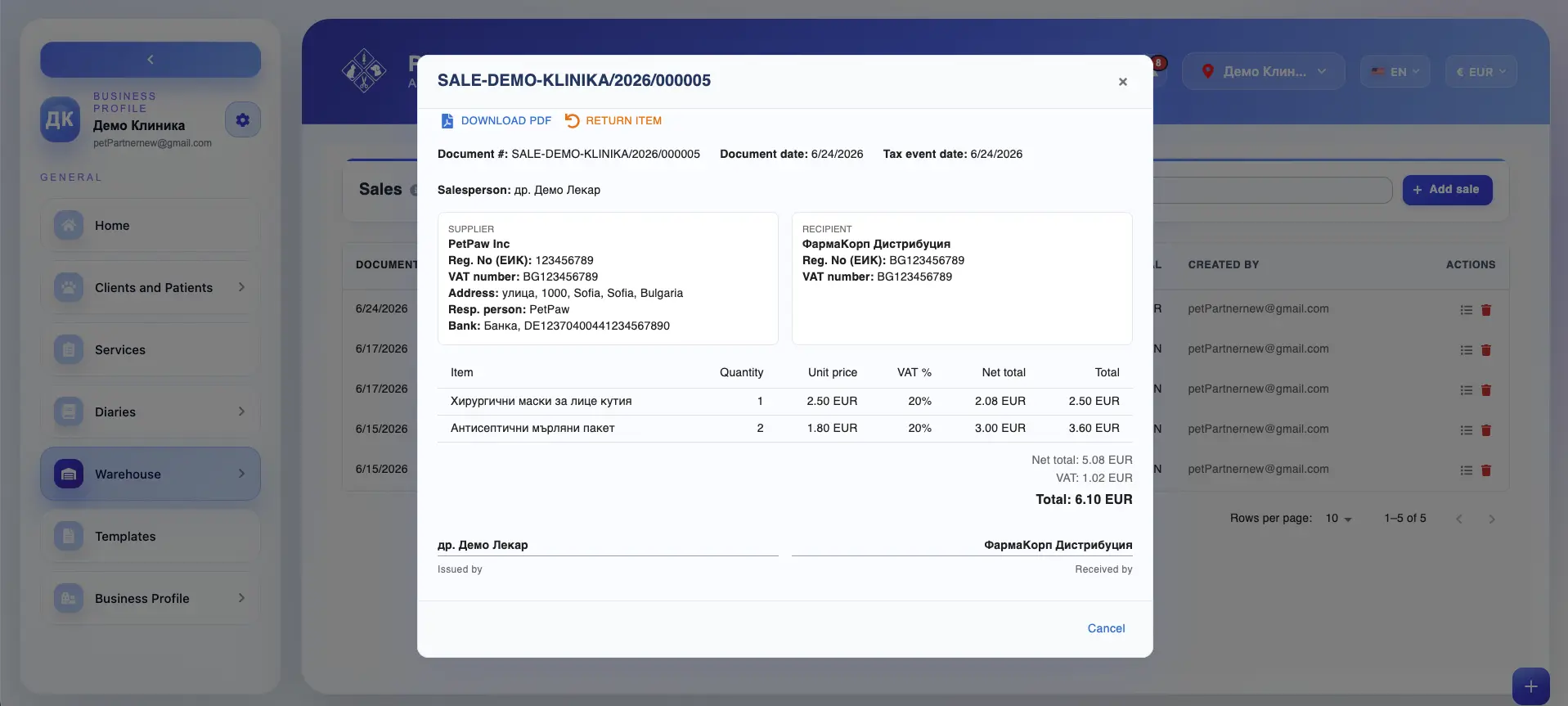
Where returns and document actions are available
Returns and document actions are usually available from warehouse documents such as:
- Deliveries
- Sales
When you open an existing document, you can typically:
- review the document details
- see the line items included in the document
- export the document as PDF
- create a return based on the original transaction
The exact actions available depend on the document type, workflow, and your permissions.
Open a document in detail
Warehouse documents can be opened in a detailed view for review. A detailed document view may include:
- document number
- document date
- tax event date, if applicable
- supplier or sender details
- customer or recipient details
- item rows
- quantities
- unit prices
- VAT values
- subtotal and total values
- notes or internal references
- document creator or responsible employee
This allows your clinic to review the full warehouse transaction in a structured and printable format.
Export a document as PDF
Delivery and sales documents can usually be exported as PDF. PDF export is useful when you need to:
- keep a static copy of the warehouse document
- print the document for internal use
- share the document internally
- store the document outside the system
- review the full item and pricing breakdown in a fixed format
The exported PDF typically reflects the details stored in the document at the time of export.
What is a return?
A return is a warehouse transaction used to reverse part or all of a previously recorded delivery or sale. Returns are useful when:
- a supplier delivery needs to be partially or fully reversed
- a sale needs to be canceled or corrected
- products are returned by a client
- a wrong item or quantity was recorded in the original document
- stock needs to be adjusted while preserving the original document trail
Rather than deleting the original document, the return creates a separate reversing record linked to it.
What a return can do
Depending on the document and warehouse workflow, a return can reverse:
Part of a document
You can return only selected items or selected quantities from the original delivery or sale. This is useful when only part of the transaction needs to be corrected.
All of a document
You can return the full document and reverse all included items. This is useful when the entire delivery or sale should be canceled or reversed.
Return reason
When creating a return, the system may require or allow you to enter a reason. Examples of return reasons may include:
- wrong item delivered
- damaged goods
- expired or unusable stock
- sale entered by mistake
- incorrect quantity
- client return
- supplier correction
- internal stock correction
Adding a clear return reason helps your clinic maintain better traceability and makes document history easier to understand later.
Create a return from a delivery or sale
To create a return:
- Open the original delivery or sale document.
- Review the document details and item rows.
- Select the option to Return Item or create a Return.
- Choose which items or quantities should be reversed.
- Enter a return reason, if required.
- Save and approve the return according to your workflow.
Once approved, the return updates stock by reversing the relevant part of the original transaction.
How returns affect stock
Returns are directly connected to warehouse stock and movement history. The exact effect depends on the original document type:
Return of a delivery
If you return items from a delivery, the returned quantities are typically removed from stock because they are no longer considered part of received warehouse inventory.
Return of a sale
If you return items from a sale, the returned quantities are typically added back to stock because the sold items are being reversed back into warehouse availability.
In both cases, the return creates a new stock movement record while leaving the original delivery or sale document unchanged.
Preserving original document history
One of the key benefits of the Returns and Documents workflow is that it preserves the original transaction history. This means:
- the original delivery or sale stays in the system
- the return is recorded as a separate linked document
- stock changes remain traceable over time
- audits and internal reviews can clearly distinguish the original transaction from the reversal
- document history remains more reliable than if the original record were edited or deleted
This approach helps clinics maintain cleaner warehouse records and stronger stock accountability.
Reviewing returned documents
When reviewing warehouse history, your clinic may be able to see:
- the original delivery or sale document
- the related return document
- which items were returned
- what quantities were reversed
- the reason for the return
- how the stock was affected
This makes it easier to understand why stock changed and to reconstruct warehouse activity later.
Why Returns and Documents are important
The Returns and Documents workflow helps your clinic:
- keep a detailed record of deliveries and sales
- export warehouse documents when needed
- reverse stock safely without deleting the original transaction
- preserve traceability and audit history
- correct stock errors more cleanly
- manage returned goods and reversed sales in a structured way
It is an important part of maintaining accurate and accountable warehouse operations.
Best practices
To use Returns and Documents more effectively:
- Review the original document carefully before creating a return
- Return only the affected items or quantities when possible
- Always enter a clear return reason if your workflow supports it
- Use PDF exports when you need a static copy for internal review
- Avoid deleting original warehouse documents when a return is the correct action
- Limit return permissions to authorized staff when possible
Important notes
Returning a document does not remove the original delivery or sale from history. Incorrect return quantities or unclear return reasons may make stock history harder to review later.
- The available return actions may depend on the document type, document status, and user permissions.
- Some workflows may require approval before a return affects stock.