
Counterparties
What are Counterparties?
The Counterparties page is used to manage the external businesses and partners your clinic works with in the warehouse module. These records can represent suppliers, customers, manufacturers, distributors, or other organizations involved in stock-related operations.
Instead of entering the same company details every time you create a delivery, sale, or warehouse document, counterparties allow you to store partner information once and reuse it across the system.
This improves data consistency, speeds up document creation, and helps keep warehouse records more complete and organized.
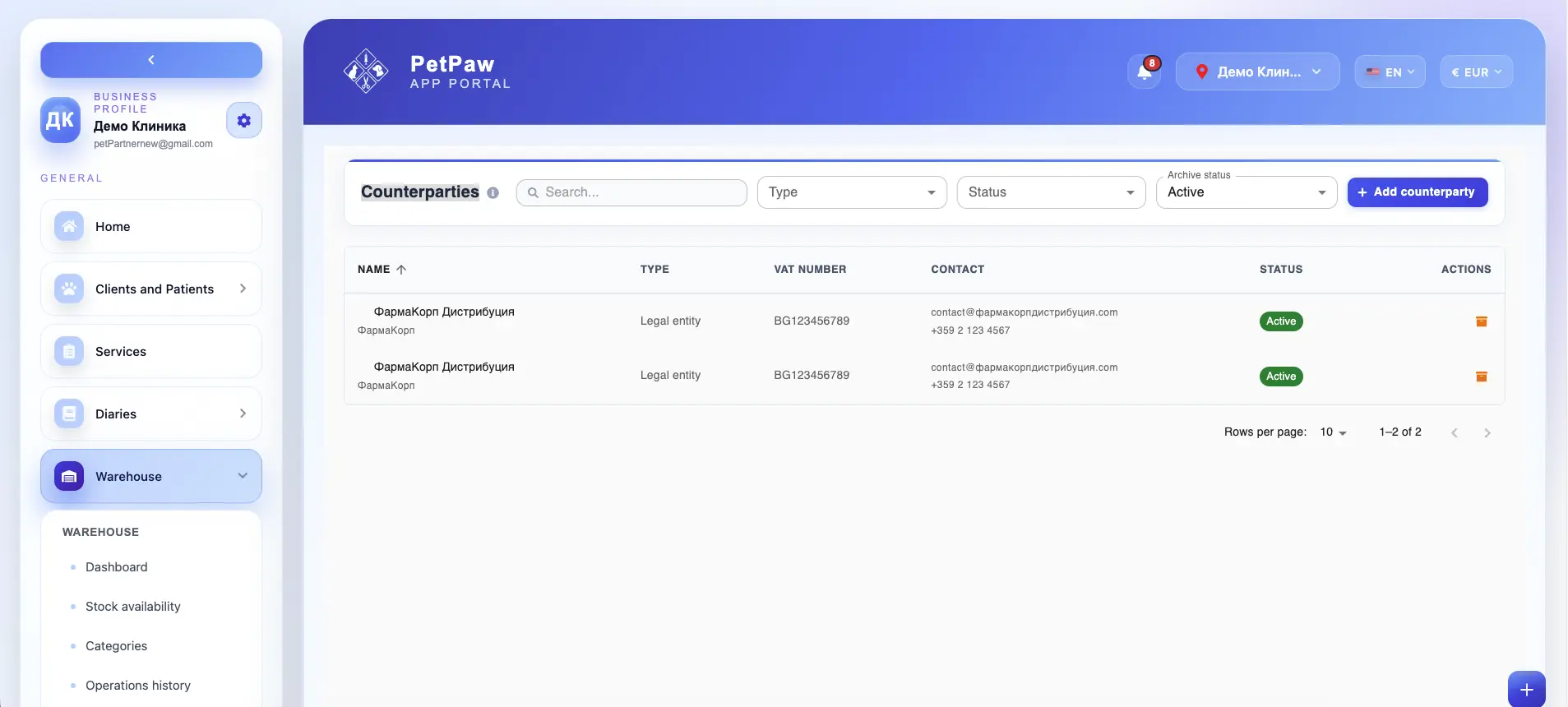
How to open Counterparties
- Log in to the app portal.
- From the left navigation menu, open Warehouse.
- Select Counterparties.
The page opens as a list of saved counterparty records, where you can review, search, filter, create, and manage business partners used in warehouse operations.
What counterparties are used for
Counterparties are used to store the business details of organizations your clinic interacts with through the warehouse workflow.
They can be used for:
- suppliers that deliver stock to your clinic
- customers that buy stock from your clinic
- manufacturers linked to products or supply chains
- distributors involved in deliveries or resale
- other business partners connected to warehouse documents
Once a counterparty is created, its data can be reused in:
- Deliveries
- Sales
- warehouse-related documents
- internal stock records and references
This reduces repetitive manual entry and makes document data more reliable.
What information a counterparty can include
Depending on your warehouse setup, a counterparty record may include a wide range of business details.
Name
The legal or display name of the company or business partner.
Type or role
The role of the counterparty in your warehouse workflow.
Examples may include:
- Supplier
- Customer
- Manufacturer
- Distributor
- Other partner type
Some counterparties may have more than one role depending on how your clinic works with them.
VAT number
The VAT registration number of the company, if applicable.
This is useful for invoice-related warehouse documents and financial references.
Registration number
A business registration number or other company registration identifier, depending on the country and business type.
Contact details
Counterparties can include contact information such as:
- contact person
- email address
- phone number
This makes it easier for your team to quickly identify or reach the right business contact when preparing deliveries, sales, or stock corrections.
Country
The country where the counterparty is registered or operates.
Preferred currency
The default currency typically used when working with that counterparty.
This can help standardize pricing and document creation in deliveries or sales.
Address
The registered or operational business address of the counterparty.
VAT status
Information about whether the company is VAT registered or how VAT should be treated in documents, depending on your business workflow.
Notes
Optional internal notes that help your team understand how the counterparty should be used or any important operational details related to that partner.
Create a new counterparty
To add a new business partner:
- Open the Counterparties page.
- Click Add Counterparty.
- Enter the company or business partner details.
- Select the appropriate type or role.
- Add VAT number, registration number, contact details, and other relevant information.
- Save the record.
Once created, the counterparty becomes available for reuse in warehouse operations.
Use counterparties in deliveries
Counterparties are especially useful when creating deliveries.
For example, when stock is received from a supplier, the delivery can use an existing counterparty record instead of requiring users to enter the supplier details manually each time.
This helps keep delivery documents more consistent by reusing:
- supplier name
- VAT details
- registration details
- address
- contact information
- preferred currency
It also reduces mistakes caused by manual retyping.
Use counterparties in sales
Counterparties can also be reused in sales when stock is sold to another business or organization.
Instead of manually entering customer details for every sale, users can select an existing customer counterparty and reuse the stored business information.
This helps standardize sales documents and makes customer-related warehouse records easier to maintain.
Why counterparties improve warehouse document quality
Counterparties improve the quality of warehouse data because they centralize partner information in one place.
This helps your clinic:
- avoid repeated manual entry
- reduce inconsistent company names across documents
- reuse VAT and registration details correctly
- prepare deliveries and sales faster
- keep supplier and customer records cleaner
- make warehouse documents more complete and easier to review later
In practice, counterparties work as a shared source of truth for business partner data used across warehouse transactions.
Searching and filtering counterparties
Depending on your setup, the Counterparties page may allow you to search and filter records by:
- company name
- type or role
- status
- archive status
This is useful when your clinic works with many suppliers, customers, or business partners and needs to find the correct record quickly.
For example, users may filter only:
- suppliers
- customers
- active counterparties
- archived counterparties
Active and archived counterparties
Some warehouse setups may support different record statuses, such as active and archived counterparties.
Active counterparties
These are business partners currently available for normal use in warehouse operations such as deliveries and sales.
Archived counterparties
Archived counterparties are kept in the system for history and traceability, but may no longer be used in current workflows depending on your setup.
Archiving can be useful when:
- a supplier is no longer active
- a customer relationship has ended
- a distributor or manufacturer is no longer used
- old records need to be preserved without appearing in the main active list
This keeps warehouse data clean while preserving document history.
Why the Counterparties page is important
The Counterparties page helps your clinic:
- store supplier and customer information in one place
- reuse partner data in deliveries, sales, and warehouse documents
- reduce repeated manual data entry
- keep company information more structured and consistent
- improve document accuracy and operational efficiency
- preserve better long-term warehouse records
Even though counterparties do not directly change stock quantities, they are a key part of accurate warehouse documentation and partner management.
Best practices
To use Counterparties more effectively:
- Create a counterparty record before using the business in deliveries or sales
- Use consistent company names to avoid duplicates
- Fill in VAT and registration details carefully when they are needed for documents
- Add contact information that is actually useful to warehouse and admin staff
- Archive old counterparties instead of deleting them if they are already linked to documents
- Review supplier and customer records periodically to keep them up to date
Important notes
If a counterparty is already linked to deliveries, sales, or warehouse documents, it may be better to archive the record instead of deleting it to preserve document history.
- Counterparties are used to store business partner data, not to directly change stock quantities.
- The exact fields available may vary depending on your warehouse configuration.
- Some counterparties may serve multiple roles, such as both supplier and distributor.