
Reports and Analytics
Reports and Analytics
The "Reports" module provides detailed information about revenue, services, and medications at your clinic.
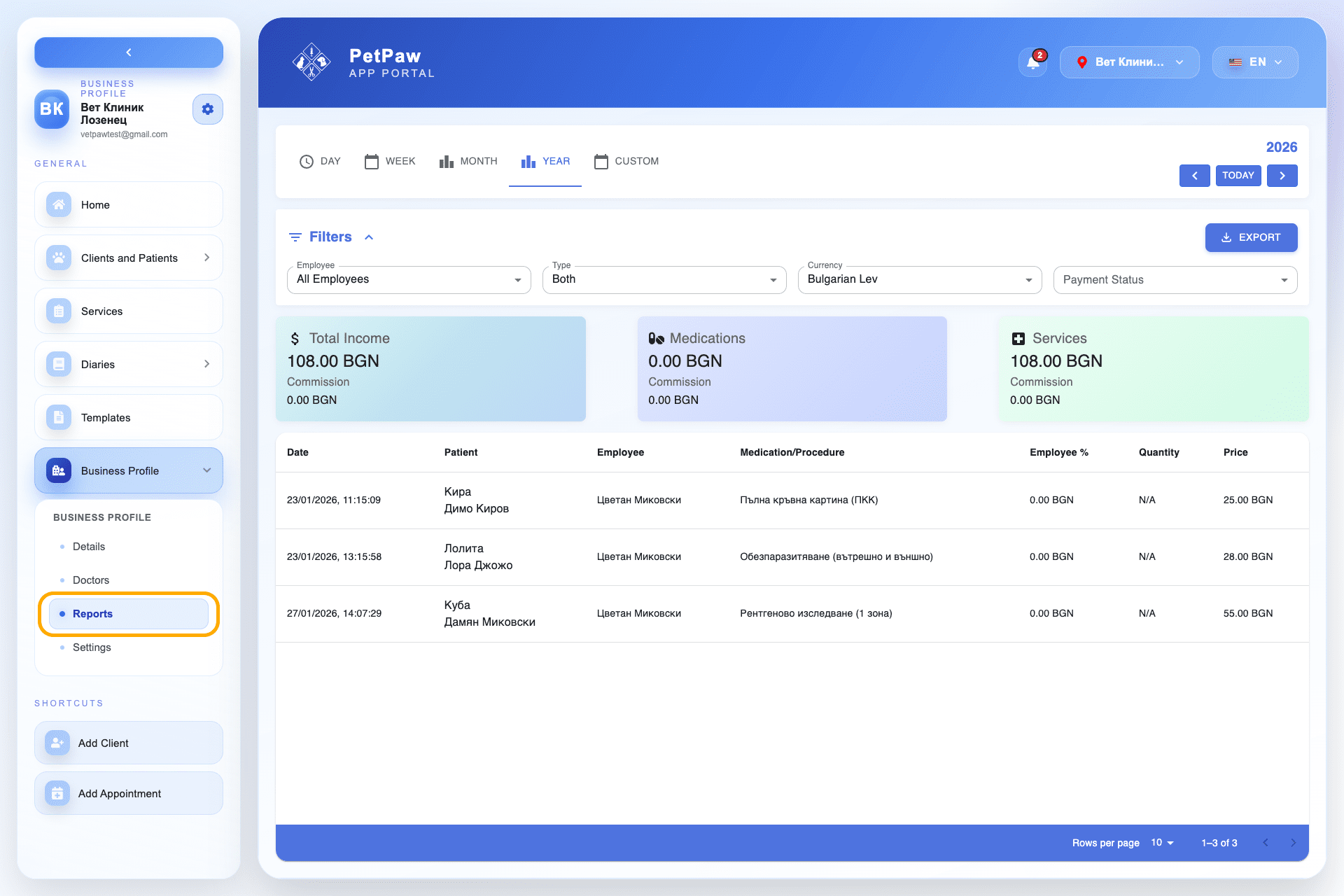
It allows:
- Financial results analysis
- Tracking of performed services
- Medication monitoring
- Data filtering and export
Viewing Reports
At the top, you can select a period:
- Day
- Week
- Month
- Year
- Custom period
The system automatically updates data according to the selected range.
Financial Summary
You will see key indicators:
- Total revenue
- Revenue from medications
- Revenue from services
- Commissions (if applicable)
These values update dynamically based on filters.
Filtering Data
You can filter reports by:
- Employee
- Type (services / medications)
- Currency
- Payment status
Filters allow for more accurate business analysis.
Details Table
The table shows:
- Date
- Patient
- Employee
- Medication or procedure
- Employee percentage
- Quantity
- Price
This allows you to track every transaction.
Exporting Reports
Click "Export" to download the data.
Export allows for:
- External analysis
- Accounting reports
- Archiving
Tips
- Use yearly view for strategic analysis.
- Filter by employee to evaluate performance.
- Check payment statuses for financial control.